

Rent & payments
Stop chasing rent by text message.
One ledger for rent, partial payments, one-off charges and deposits, with automated reminders so you are not the one starting the awkward conversation.
Your first rental free · No credit card · See pricing
The monthly ritual most landlords describe
Rent is late. You wait two days because you do not want to seem aggressive. Then you send a text you rewrite three times. The payment lands, you note it somewhere, and the record of what happened lives in a message thread you will never find again.
Landlords told us this was the part of the job that damaged the relationship most, and it is entirely avoidable. Reminders should come from a system, not from you.
One ledger instead of a spreadsheet
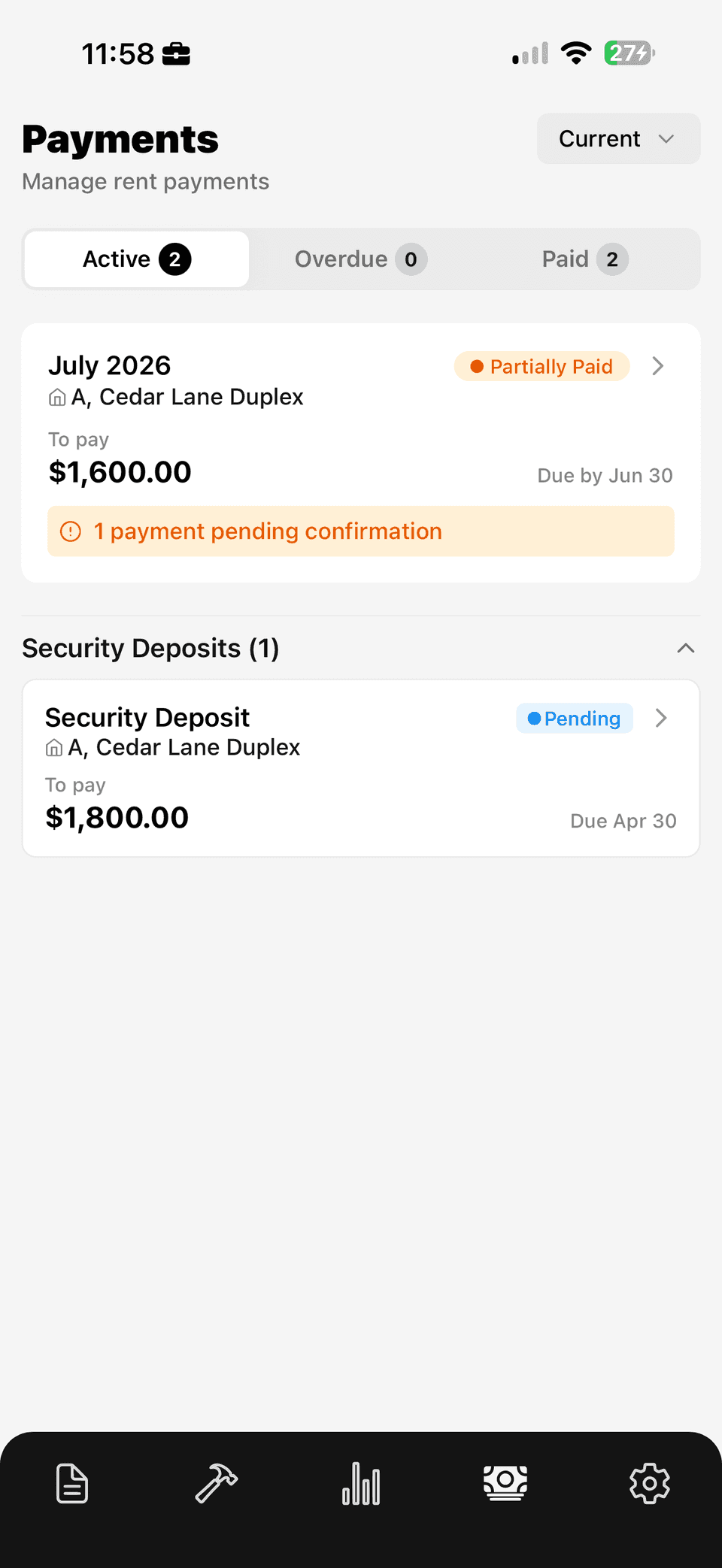
Propsynk tracks rent per lease with partial payments and one-off charges in the same ledger, so a month where someone paid two thirds on time and the rest late reads correctly rather than as a mystery.
Every payment carries a status: paid, pending, overdue, or awaiting your confirmation when a tenant has reported a payment you have not verified yet. Across a portfolio, the dashboard rolls that up so you know what is outstanding without opening each unit.
Why the received date matters more than the due date
Most informal rent tracking records the month: paid, or not paid. That is enough to run a good tenancy and useless in a bad one.
Recording the date a payment actually arrived is what lets you see a pattern — consistently four days late, or slipping further each month — early enough to have a calm conversation rather than a formal one. If a dispute does happen, a ledger of received dates is the difference between asserting that rent was habitually late and demonstrating it.
Propsynk records payments against the date received, keeps partial payments as partial payments, and notes one-off charges with what they were for, so the ledger reads accurately a year later when nobody remembers the details.
Security deposits tracked as money, not memory
Deposits sit alongside rent with their own due dates and status. Deposit disagreements are among the most common tenancy disputes in Canada, and they are usually decided by whoever has the clearer record of what was collected, when, and what condition the unit was in at each end of the tenancy.
Keeping the deposit record with the lease and the move-in documentation means that at move-out you are comparing evidence rather than recollections.
What you get
In the app, on day one.
Full rent ledger
Rent, partial payments and one-off charges in one place.
Automated reminders
The system chases the payment instead of you.
Payment states
Paid, pending, overdue, and awaiting your confirmation.
Security deposits
Tracked with due dates and status alongside rent.
Portfolio roll-up
Outstanding rent across every property at a glance.
Tenant view
Tenants see an itemized breakdown of every charge.
Questions
Rent tracking, answered.
Does Propsynk collect rent payments directly?
Propsynk tracks rent and payment status rather than acting as the payment rail for rent. Contractor and maintenance job payments are processed through Stripe.
Can I record a partial rent payment?
Yes. Partial payments are first-class in the ledger, so a month that was paid in two instalments reads accurately instead of showing as unpaid or fully paid.
What do tenants see?
Tenants get their own view with itemized rent, what has been paid, what is due, and a breakdown of every charge, which removes most of the back-and-forth about what is actually owed.
Is rent tracking on the free plan?
Yes. Rent tracking, due dates, payment history and deposits are included for your first active rental, free forever. Pro at $29.99 CAD per month lets you activate additional rentals, subject to the product's portfolio limits.
Can I track utilities and one-off charges?
Yes. One-off charges are recorded in the same ledger as rent with a note of what they were for, so shared utility costs and incidental charges do not end up in a separate spreadsheet.
More on digital leases and maintenance, or read the guides for Canadian landlords.
Get started
Set your rental up once, and keep the record.
Your first active rental is free, forever.